
Remote Desktop Protocol (RDP) has become a cornerstone of modern IT operations, enabling users to access servers and desktops from virtually anywhere. However, not all RDP solutions are created equal. While standard RDP provides basic remote access, Admin RDP offers full administrative privileges, giving IT professionals enhanced control, flexibility, and security. Many organizations turn to Admin RDP when they need more than just a remote connection—especially when managing multiple servers or complex infrastructures.
Choosing between Admin RDP and Regular RDP can be confusing, particularly for businesses or IT teams that are evaluating cost, performance, and security. This article explores the key differences, benefits, and limitations of both options, helping you decide which is the right fit for your needs.
Understanding Regular RDP
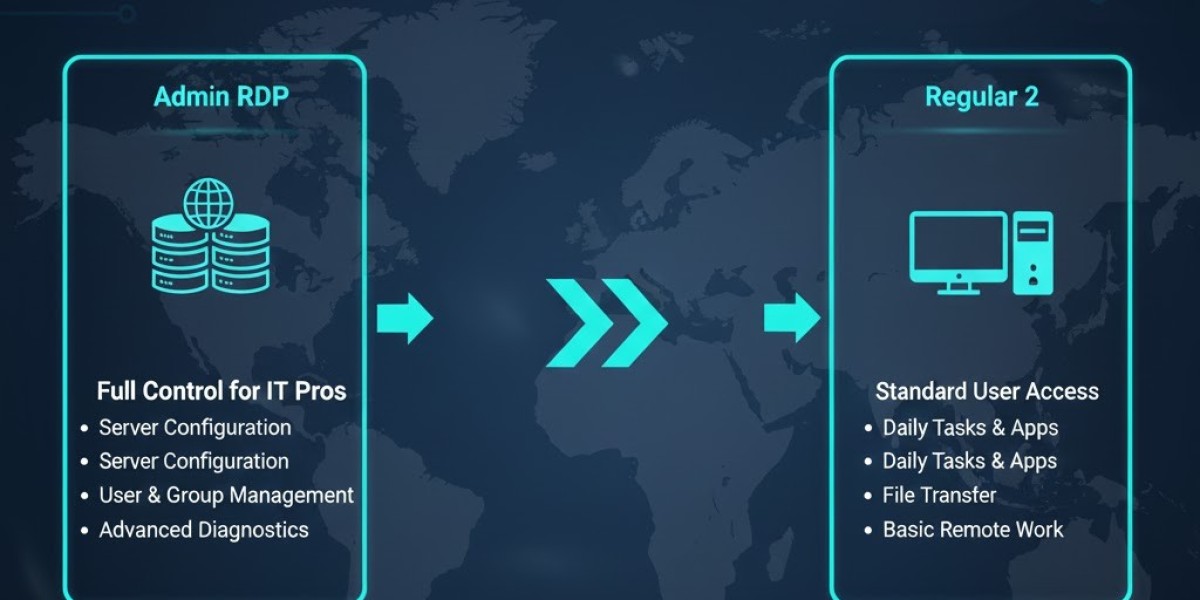
Regular RDP is the standard version of Remote Desktop Protocol provided by Windows and other operating systems. It allows users to remotely connect to a server or desktop and perform tasks within a limited permission scope.
Basic Features of Regular RDP
Remote access to applications and files
Screen sharing and basic administrative functions
Limited ability to modify system settings
Single-user access in most cases
Regular RDP is suitable for general remote work, such as accessing files, running software, or supporting users. However, it may lack the full administrative capabilities needed for advanced server management.
Limitations of Regular RDP
Cannot install system-level software or make certain configurations
Limited access to advanced security and monitoring tools
Often restricted to one session per server
Less flexibility for IT professionals managing multiple systems
For businesses or teams that only need basic remote access, regular RDP is often sufficient. But for complex environments or multi-user setups, its limitations become apparent.
Understanding Admin RDP
Admin RDP is designed for IT professionals who need full administrative control over a remote server. Unlike regular RDP, Admin RDP removes many restrictions and provides advanced capabilities for managing systems efficiently.
Key Features of Admin RDP
Full access to system files and configurations
Ability to install, update, and configure software
Support for multiple simultaneous sessions
Advanced monitoring and troubleshooting tools
Enhanced security controls
Admin RDP is particularly valuable for IT teams, developers, and businesses managing multiple servers, as it combines flexibility, control, and efficiency in a single solution.
Comparing Admin RDP and Regular RDP
Choosing the right RDP depends on your operational needs, security requirements, and the complexity of your server infrastructure. Let’s compare them across key factors:
1. Access and Control
Regular RDP: Provides user-level access with limited ability to modify server configurations. Ideal for routine tasks but restrictive for advanced server management.
Admin RDP: Grants full administrative privileges, enabling IT professionals to manage configurations, install software, and control user permissions.
Verdict: Admin RDP wins for professionals requiring complete control over server environments.
2. Security
Regular RDP: Basic security features, such as login credentials and encryption. Limited control over advanced security settings.
Admin RDP: Supports advanced security measures, including two-factor authentication, firewall management, and detailed user activity monitoring.
Verdict: Admin RDP offers superior security for sensitive operations.
3. Multi-User Capabilities
Regular RDP: Typically allows only one session at a time, which can be limiting for teams.
Admin RDP: Supports multiple concurrent sessions, making it ideal for collaborative IT work or large teams managing the same server.
Verdict: Admin RDP is better for team environments or multi-task management.
4. Performance and Efficiency
Regular RDP: Sufficient for basic tasks but can slow down when managing complex operations or multiple servers.
Admin RDP: Optimized for high performance, allowing simultaneous monitoring, software installation, and configuration management without interruptions.
Verdict: Admin RDP enhances efficiency for professional IT environments.
5. Cost Considerations
Regular RDP: Generally less expensive and included with many operating systems. Suitable for basic access requirements.
Admin RDP: Often comes at a higher cost due to enhanced features, security, and multi-user support.
Verdict: Regular RDP is cost-effective for simple tasks, while Admin RDP provides greater value for professional use despite higher costs.
When to Choose Regular RDP
Regular RDP is suitable in scenarios where:
Only basic remote access is needed
Single-user access is sufficient
Advanced system configuration or monitoring is not required
Cost constraints prevent investing in premium RDP solutions
For example, small businesses or individual users who need occasional access to documents or applications may find regular RDP adequate.
When to Choose Admin RDP
Admin RDP is ideal for:
IT professionals managing multiple servers
Businesses with complex or large-scale infrastructure
Teams requiring simultaneous multi-user access
Organizations needing enhanced security and monitoring
Situations where advanced troubleshooting and system configuration are essential
Essentially, if you need full control, flexibility, and high efficiency, Admin RDP is the superior choice.
Key Benefits of Admin RDP for IT Professionals
Centralized Management
Admin RDP allows IT teams to manage multiple servers from a single interface. This centralization reduces errors, saves time, and simplifies maintenance.
Faster Troubleshooting
With full access, administrators can quickly identify and resolve issues, minimizing downtime and maintaining business continuity.
Enhanced Security
Full control over user permissions, firewall settings, and activity monitoring ensures that sensitive data and systems remain protected.
Improved Collaboration
Multiple administrators can work simultaneously on the same server, coordinating tasks without interfering with each other’s work.
Scalability
Admin RDP supports expansion as businesses grow, allowing new servers and applications to integrate seamlessly into existing infrastructure.
Security Best Practices for Admin RDP
Even with advanced features, proper configuration is critical. IT professionals should implement these best practices:
Use strong, unique passwords
Enable two-factor authentication (2FA)
Limit access to trusted IP addresses
Keep software and operating systems up to date
Monitor activity logs for unusual behavior
These measures ensure that the full power of Admin RDP is used securely and responsibly.
Conclusion: Making the Right Choice
Choosing between Admin RDP and regular RDP ultimately depends on your needs. If you require basic remote access for simple tasks, regular RDP is sufficient and cost-effective. However, for IT professionals, developers, and businesses managing multiple servers or complex infrastructures, Admin RDP provides unparalleled control, efficiency, and security.
Admin RDP is not just a tool for remote access—it’s a transformative solution for professional server management. By offering full administrative privileges, enhanced security, multi-user support, and centralized control, it empowers IT teams to work smarter, respond faster, and maintain operational excellence.
For organizations or individuals serious about remote server management, Admin RDP is the clear choice. Investing in the right RDP solution ensures long-term productivity, security, and scalability in today’s fast-paced digital environment.